Free COI Checker
Check one Certificate of Insurance before you approve a vendor, contractor, tenant, or service provider.
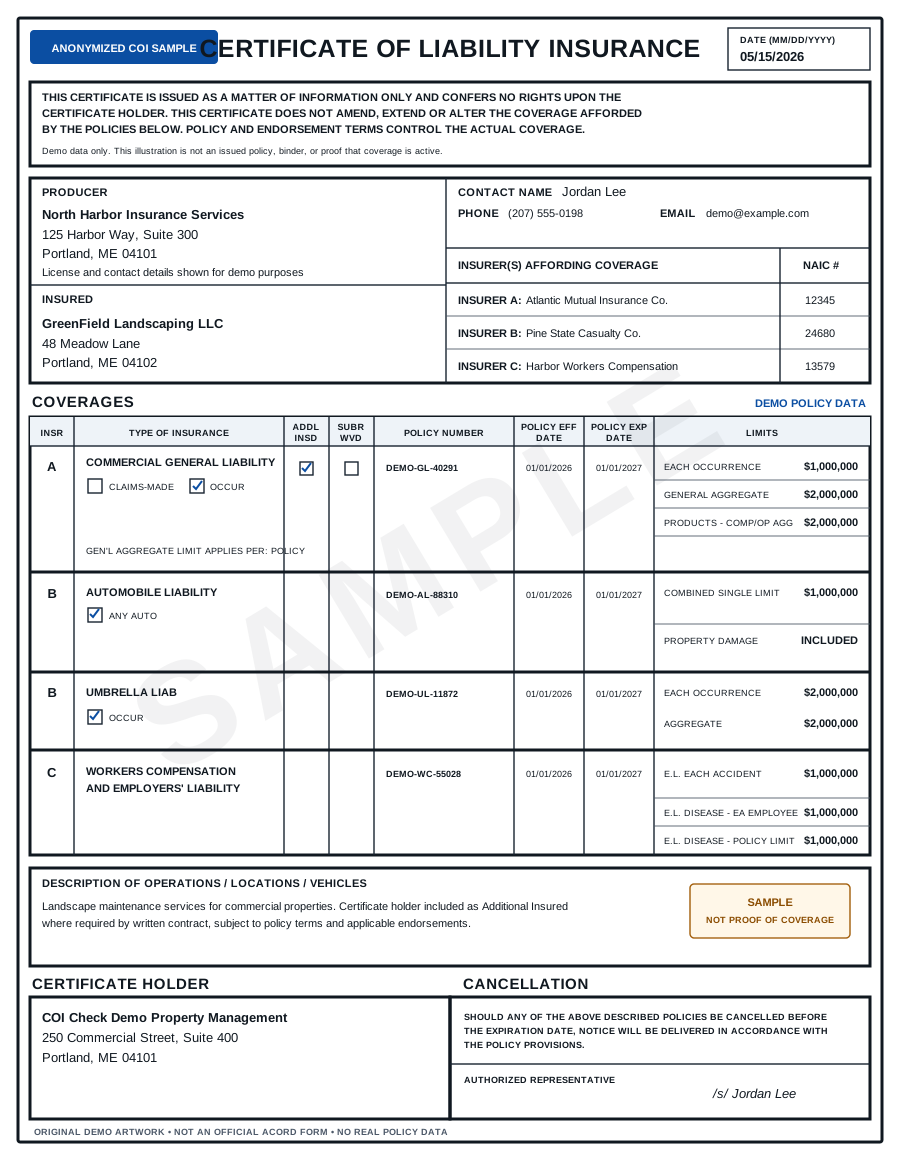
COI Check is built around one job: upload or submit a COI and get a clear document-level result – PASS, FAIL, or NEEDS REVIEW. Use it when you need to know whether the certificate appears to match common vendor insurance requirements before work starts.
What this page helps you check
A COI review should answer practical questions:
- Is the certificate still active?
- Are the General Liability limits high enough?
- Is Workers' Compensation shown when it is required?
- Is Commercial Auto shown when the vendor drives for the job?
- Is the right Certificate Holder listed?
- Does the certificate mention Additional Insured status when the contract requires it?
- Is Waiver of Subrogation indicated or missing?
- Are there blank, unclear, or incomplete fields that should be reviewed by a broker?
If you are not sure what your requirements should say, start with the vendor insurance requirements hub or the COI requirements checklists.
Example result
Status: FAIL
The certificate should not be accepted yet.
| Requirement | Result | What to do next |
|---|---|---|
| General Liability per occurrence | FAIL | Certificate shows $500,000. Requirement is $1,000,000. |
| Workers' Compensation | FAIL | Coverage was not found. Ask the vendor or broker for an updated COI. |
| Expiration date | NEEDS REVIEW | Certificate expires in 12 days. Confirm whether renewal is already in progress. |
| Additional Insured | NEEDS REVIEW | Wording is unclear. Ask for corrected wording or endorsement evidence if required. |
What to send the vendor
When a COI fails, send a short correction request instead of a vague rejection.
Sample message:
Please send an updated Certificate of Insurance showing $1M General Liability per occurrence, Workers' Compensation coverage, and Additional Insured status for [Company Name]. The current certificate is missing or unclear on those items, so we cannot approve it yet.
For more copy-paste options, use the COI request email templates or the guide to common COI deficiencies.
When a COI should be marked needs review
Some items should not be treated as a simple pass or fail from the certificate alone:
- endorsement wording is required but not attached,
- the insured legal name does not clearly match the vendor,
- the Description of Operations is vague,
- a limit appears to apply differently than expected,
- the certificate looks altered or inconsistent,
- the work is high risk and should be confirmed by a broker, carrier, legal team, or risk advisor.
COI Check is useful for document-level triage. It does not replace carrier verification, legal review, or broker confirmation.
Start with one certificate
Use the upload flow to check a single COI or request early access/manual review. The goal is to make the first review faster and more consistent before you move to full vendor tracking.
Related resources:
- COI Compliance Checker
- Certificate of Insurance Verification
- Additional Insured COI Checker
- Subcontractor COI Checker
FAQ
Is this a replacement for an insurance broker or attorney?
No. COI Check reviews the certificate document against selected requirements and flags missing or unclear items. It does not provide legal advice, insurance advice, or a guarantee that coverage is active.
What file types are supported?
The current checker flow is intended for Certificate of Insurance documents, especially ACORD 25-style PDFs. Readable PDFs are the best fit. Scanned or unclear files may require manual review.
What does PASS mean?
PASS means the certificate appears to satisfy the selected document-level checks. It does not prove that coverage is active, that endorsements exist, or that a carrier has confirmed the policy.
What does NEEDS REVIEW mean?
NEEDS REVIEW means the certificate has unclear, incomplete, or higher-risk information that should be checked by a qualified person, broker, carrier, or legal/risk advisor.
Disclaimer
COI Check provides document-level review of Certificates of Insurance. It does not provide legal advice, insurance advice, or a guarantee that coverage is active. For high-risk work, suspicious certificates, unclear endorsements, or coverage questions, confirm details with the issuing broker, carrier, legal counsel, or risk advisor.