ACORD 25 Checker
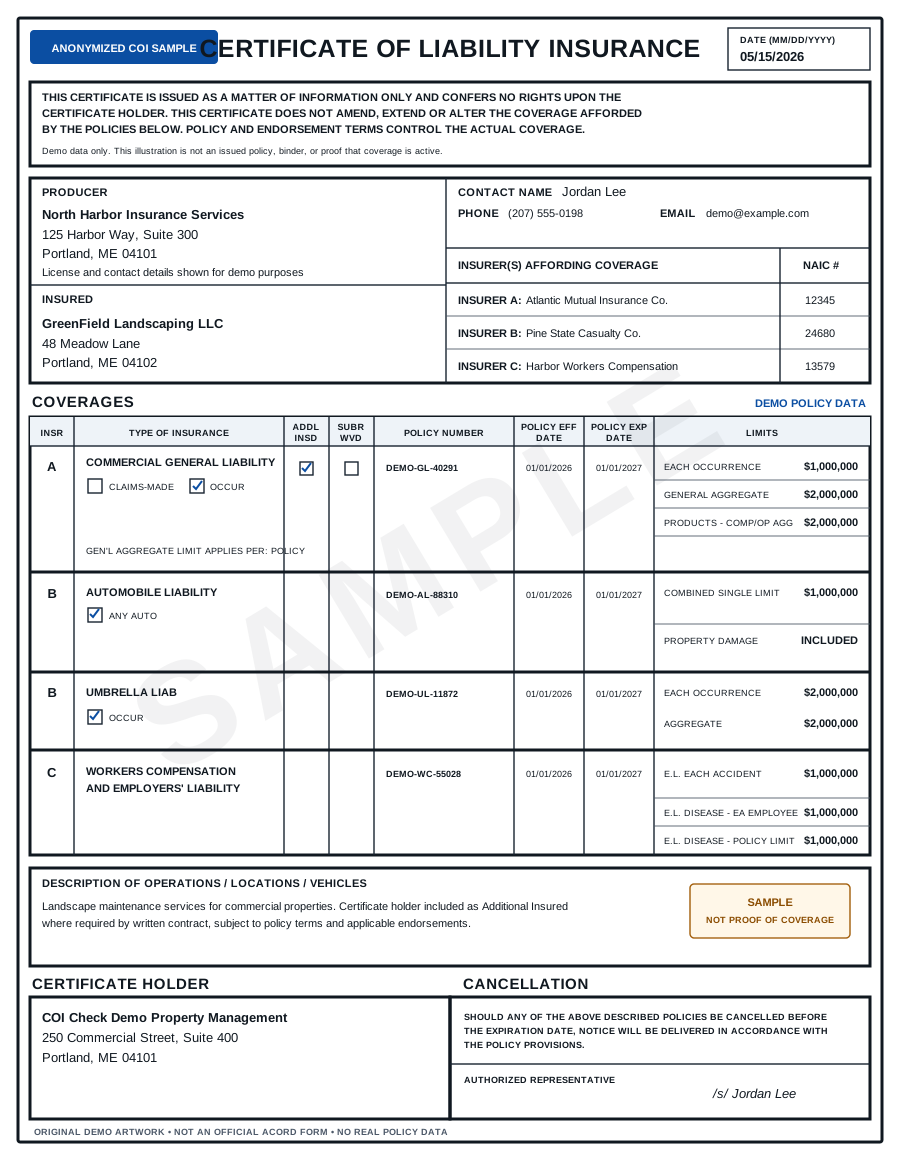
Turn an ACORD 25 PDF into a structured compliance report.
Upload a Certificate of Liability Insurance and extract the fields your team normally checks by hand.
Extract key fields from ACORD 25
The checker reads common ACORD 25 fields, including:
- Producer
- Insured
- Insurers
- Policy numbers
- Effective dates
- Expiration dates
- General Liability
- Automobile Liability
- Umbrella / Excess Liability
- Workers’ Compensation
- Certificate Holder
- Description of Operations
- Additional Insured indicators
- Waiver of Subrogation indicators
From PDF to JSON
Need structured output?
Export extracted fields as JSON or CSV so you can store results in your internal system, spreadsheet, vendor file, or compliance workflow.
Add compliance rules
Extraction is only the first step.
After the checker reads the ACORD 25, it compares the result against your requirements and flags missing coverage, low limits, expired policies, and unclear certificate language.
FAQ
Is ACORD 25 the same as a Certificate of Insurance?
ACORD 25 is a common standardized Certificate of Liability Insurance form. Many COIs use this format or a similar layout.
Can I export the extracted data?
Yes. The checker can return structured fields such as dates, limits, policy numbers, and coverage types.
Does it work only with ACORD 25?
The checker is optimized for ACORD 25-style Certificates of Insurance, but it may also extract data from similar COI PDFs.
Disclaimer
This tool provides document-level review of Certificates of Insurance. It does not provide legal advice, insurance advice, or guarantee that coverage is active. For high-risk work, suspicious certificates, or unclear endorsements, confirm details with the issuing broker, carrier, or legal counsel.